Medical records
- 3.7
- Rating
- 100.00K
- Installs
- Free
- Price
 Analysis by App-foxy
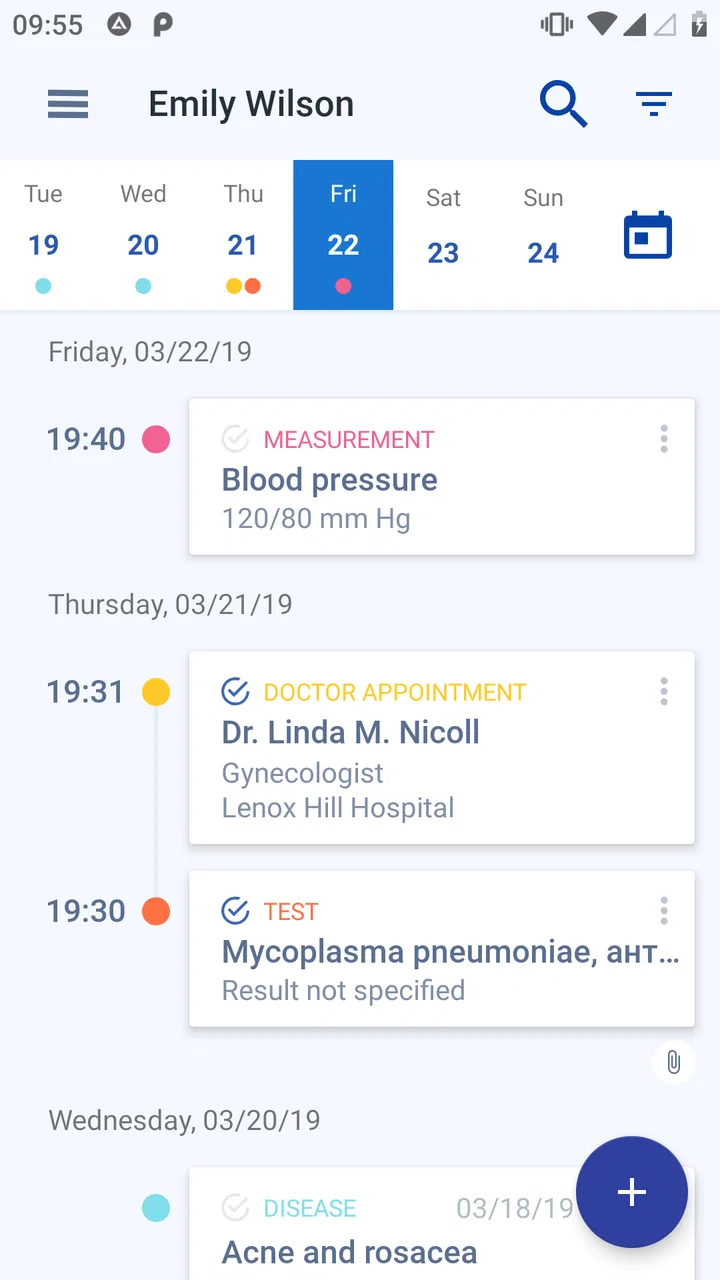
Keeping medical information close at hand sounds simple, but the practical value depends on how quickly I can reach it when I need it. Medical records is an Android medical app from Volodymyr Yerokhin that is built around that straightforward idea: a personal electronic medical card rather than a general health-content service. I see it as a compact place to organize information I may otherwise have scattered across paper notes, phone photos, messages, and memory.
That focus makes the app easier to understand than many broader health platforms. It is not trying to be a symptom-search engine, a fitness tracker, or a replacement for a doctor. Its usefulness comes from preparation. If I keep important details organized before an appointment, a pharmacy visit, or an unexpected consultation, I spend less time trying to remember dates, medicines, and previous medical information.
The app is free to install and is rated for Everyone, which makes it approachable for households that want a basic digital record. It has passed over one hundred thousand installs, and its average rating is 3.7 from around six hundred ratings, so the public response looks mixed but substantial enough to show that people are using it for a real everyday need. I would describe it as a practical utility with a narrow purpose, not a polished all-in-one healthcare companion.
You May Also Like

 Blood Strike: 2.5 Anniversary
Blood Strike’s Loadouts Turn Every Drop Into a Tactical Gamble
A close look at Blood Strike’s custom loadouts: how fast access to signature weapons reshapes its battle royale rhythm, rewards preparation, and narrows the gap between fights.

 Pandora - Music & Podcasts
Pandora’s Music Is Easy to Start, but Harder to Recover
Pandora’s strength is its low-effort path from a seed to a station. Its weak spot is how much confidence it asks you to place in connection, setup, and quiet recovery.

 8 Ball Pool
 Is Built on Rivalries, Rematches, and Routine
A close look at the rivalries, rematches, shared routines, and unanswered safety questions that turn a quick pool match into a persistent mobile community.

 Samsung Music
’s Quiet Strength Is Playing What You Already Own
Its reach comes less from spectacle than from dependable access to a personal library. That simplicity is both the app’s strongest retention engine and its ceiling.

 AccuWeather: Weather Radar
AccuWeather Review: A Quick, Clear Forecast for Everyday Decisions
For everyday plans, the best forecast is the one you can understand quickly. AccuWeather makes rain timing, radar, and local conditions easy to act on, with a few trade-offs.

 Hill Climb Racing
Why Hill Climb Racing Still Turns Crashes Into One More Run
A tiny car, a bumpy hill and one more upgrade: Hill Climb Racing keeps resurfacing because its simple chaos makes every near-miss feel personal.
More From Our News Desk



What using the electronic medical card feels like
My first impression is that the app makes most sense when treated as a personal reference file. The key habit is not opening it repeatedly throughout the day; it is entering information carefully and then keeping it ready for moments when accuracy matters. That changes the way I judge it. A medical-record app does not need constant entertainment value, but it does need to reduce confusion when I am tired, rushed, or speaking with someone who needs dependable background information.
The developer, Volodymyr Yerokhin, has kept the concept centered on records. That narrow scope is a strength for users who do not want a large health platform filled with unrelated dashboards. It is also a limitation for anyone expecting appointment booking, direct communication with clinics, automatic access to hospital systems, or professional interpretation of symptoms. I would not install this expecting it to connect my entire healthcare life automatically.
A useful way to begin is to enter information in calm conditions rather than waiting until an appointment is already underway. I would review medicine names, allergies, previous conditions, and other details I regularly need to repeat. The important point is consistency: a record is only helpful if I update it after a change and avoid leaving old information mixed with current information.
There is also a subtle difference between storing information and understanding it. The app can help me remember what has been recorded, but I still need to check spelling, dosage wording, and dates myself. I would use the record as a communication aid, not as proof that a treatment is suitable or that a symptom is harmless. That distinction matters especially when information has been entered quickly on a small screen.
When connectivity becomes part of the experience
The app’s central promise naturally raises a practical question: what happens when I need a medical record away from my usual routine? A phone may be in a clinic, a waiting room, a car, or another place where the connection is weak. I would not build an emergency plan around assumptions about network behavior. Instead, I would open the app before leaving home and make sure the information I expect to need is accessible in the way the current installation allows.
This is one of the most important trade-offs. A connected phone is convenient, but medical information is more sensitive than an ordinary shopping list. Network conditions can affect how smoothly any app loads or saves information, while privacy concerns affect whether I feel comfortable using public connections. I would avoid entering or editing records while connected to an untrusted public network unless the situation made it necessary.
For an appointment, my workflow would be simple. Before leaving, I would check the relevant record, confirm that recent changes are present, and keep the phone charged. At the clinic, I could then refer to the information without relying on memory. If the app requires a connection for part of the process, that pre-visit check becomes even more important. I would not wait until the reception desk to discover that a record is incomplete or unavailable.
This does not mean the app is unsuitable for travel or mobile use. It means I would treat connectivity as a condition to prepare for, not as something to ignore. A medical record is most valuable when it is available at the exact moment I need it, and preparation is what turns a convenient idea into a dependable routine.
Useful mobile situations beyond the doctor’s office
The strongest everyday scenario for me is helping another person communicate accurately. Imagine accompanying a parent to an unfamiliar clinic. They may remember that they take “a small white pill,” while I may have the name recorded. Having a structured reference on the phone can make the conversation clearer and reduce the chance of forgetting an important detail under pressure. I would still let the patient and clinician make the final decisions, but the record can support a better exchange.
Another useful situation is moving between healthcare providers. A new doctor may ask about previous conditions or current medicines before discussing the immediate problem. Instead of searching through paper folders or scrolling through unrelated phone messages, I can open the relevant information in one place. This is particularly helpful when the visit is short and the questions come quickly.
Travel is a more complicated case. The app can be useful as a personal reference while away from home, but I would prepare a second layer of protection for genuinely important information. That might mean carrying the essential details in a form I can access through my normal travel arrangements, depending on my circumstances. I would not assume that a single phone app should be the only source during a long trip, especially if battery, device damage, or connectivity could become problems.
The small-screen experience also changes how I would use it. I would prefer entering longer notes at a quiet table rather than while standing in a pharmacy line. On the move, I would use it mainly for checking information already entered. This division between careful setup and quick reference is a practical tip that makes the app feel less frustrating.
For a family, the phone itself becomes part of the workflow. If records for more than one person are kept on the same device, I would pause before showing the screen to a clinician or relative and confirm that I am viewing the right person’s information. That sounds obvious, but medical details are exactly the kind of information where a rushed tap can create an embarrassing or serious mix-up.
Failure, interruption, and recovery
No record system deserves trust merely because it opens successfully once. I would test my own routine by making a small, non-critical update and then checking that it remains present after closing and reopening the app. This is not a claim about a special backup function; it is simply a sensible way to learn how the installed version behaves before placing important information in it.
The current version is 1.2.4 and requires Android 6.0 or later. That makes compatibility fairly broad for Android users with older supported devices, but I would still check the phone before planning to rely on it. Compatibility is only the first step. Storage space, battery condition, system updates, and the general health of the device can all affect a mobile medical-record workflow.
If an entry appears incomplete, I would avoid repeatedly editing it in a hurry. First I would confirm whether the issue is a display problem, an unsaved change, or an entry that was never finished. Then I would correct one item at a time and review the result. This slower approach is worthwhile because a medical record is different from a casual note: a partial correction can be more confusing than an old entry that is clearly labeled.
I would also be cautious before changing phones. A person who has built a useful record should think about how they will retain access during a device replacement. I would not assume that installing the app on a new phone automatically recreates everything. Before deleting the old installation or resetting a device, I would review the app’s available options and make a separate plan for essential information.
That limitation is important for people who expect seamless recovery after loss or failure. Traditional paper folders are inconvenient, but they are visible and independent of a battery. A phone app is easier to carry, yet it introduces another point of failure. My recommendation is to use it as the convenient working copy while keeping a sensible fallback for information that would be difficult to reconstruct.
Privacy-minded habits matter more than convenience
Medical information deserves a different level of care from ordinary notes. I would avoid leaving the phone unlocked on a desk, handing it to someone without checking what is visible, or displaying the full record in a crowded waiting room. The app’s Everyone age rating describes who can use it; it should not be interpreted as meaning that the information itself is suitable for casual sharing.
I would also keep entries focused. The more unnecessary personal detail I add, the more information there is to protect and the harder the record may become to scan. A concise, current record is usually more useful than a long diary. For example, I would prioritize information that a clinician or caregiver might genuinely need to know, rather than copying every health-related thought into the same place.
Paid features deserve a little attention as well. Although the app is free, in-app purchases range from ninety-nine cents to five dollars and forty-nine cents per item. I would not pay simply because a feature sounds convenient. I would first identify whether it improves my actual record-keeping workflow, then check exactly what it changes before confirming a purchase. For a basic personal record, the free starting point may be enough; for someone managing more information, an optional purchase could be worthwhile if it removes a real obstacle.
I would keep the app updated through normal device maintenance, but I would review any important records after an update rather than assuming everything looks exactly the same. This is another reason not to treat the app as the sole archive. A quick check after a major change is a small effort compared with discovering a problem during a medical conversation.
Who should use it, and who should choose something else?
I think Medical records is best for someone who wants a portable, personal medical reference and is willing to maintain it manually. It suits people who often repeat the same health history, caregivers who need organized information for a family member, and users replacing a messy collection of paper scraps and phone notes. Its value grows when the user has a clear habit of reviewing and updating entries.
It is less suitable for someone looking for clinical integration. If I wanted automatic data from a hospital, direct appointment management, live consultation, or a diagnostic tool, I would look for a dedicated healthcare service provided by the relevant clinic or health system. Those tools may be better when the main goal is communication with professionals rather than personal organization.
I would also hesitate to recommend it as the only solution for a complex medical situation involving several caregivers or frequent changes. In that case, a system with clearly defined sharing, account recovery, and professional access may be a better fit. The convenience of carrying one phone does not remove the need for reliable coordination.
Compared with a paper medical card, the app is easier to carry and easier to revise without rewriting an entire page. Compared with a normal notes app, its medical focus gives the record a clearer purpose. But paper remains useful as a fallback, while a general notes app may be faster for people who only need a very short private reminder. The choice comes down to how much structure I need and how much responsibility I am prepared to take for keeping the information current.
My final view on staying prepared
After looking at the app as a real mobile tool rather than just a store description, I see a modest but useful product. It does not solve every healthcare problem, and I would not confuse an electronic card with medical advice or an official provider record. What it does offer is a focused place to organize information that is otherwise easy to forget when a conversation becomes stressful.
The connectivity question makes the recommendation more nuanced. I would use it confidently as a prepared reference, checking important records before an appointment and avoiding dependence on an uncertain connection at the last second. I would also keep a fallback for critical details, protect the phone from casual access, and review entries after changes or device transitions.
My practical verdict is that this is a useful companion for personal medical organization, provided I treat maintenance, privacy, and recovery as part of using it. The free entry point makes it easy to try, while the optional purchases mean I can decide later whether extra functionality is worth the cost. With a 3.7 average from around six hundred ratings, it is not a universal recommendation, but that feels fair: its narrow purpose will suit some people very well and leave others wanting a more connected healthcare platform.
If I wanted a simple electronic card that stays close to me and I was comfortable taking responsibility for the accuracy of my own records, I would give it a try. If I needed automatic synchronization with medical providers or guaranteed access across devices, I would choose a more integrated alternative instead. That boundary is clear, and knowing it is what makes the app easier to use responsibly.
FAQs for Medical records
01What is the Medical Records app used for?
Medical Records is designed to help you organize and manage important health information in one place. Depending on the version you use, you may be able to save details such as diagnoses, medications, allergies, appointments, test results, vaccination history, and doctor contacts. It can be useful when visiting a new healthcare provider, preparing for an appointment, or keeping track of your family’s medical information.
02Is my personal health information secure in Medical Records?
Before entering sensitive information, review the app’s privacy policy and security settings carefully. Medical data may be protected with features such as a passcode, biometric lock, encrypted storage, or secure backups, but the exact protection depends on the app version and device. Avoid sharing your login details, use a strong password, and do not store information on a shared device without enabling available privacy controls.
03Can Medical Records replace advice from a doctor or hospital?
No. Medical Records is an organizational tool and should not be treated as a diagnostic service or a replacement for professional medical care. The information you enter may help you communicate more clearly with a doctor, but it does not confirm a diagnosis, recommend treatment, or interpret symptoms reliably. For emergencies, severe symptoms, or urgent concerns, contact local emergency services or a qualified healthcare professional.
04Can I use Medical Records for several people or family members?
Many medical record applications support multiple profiles, allowing users to keep information for children, parents, partners, or other dependents. However, the available profile features can vary, and some versions may be intended only for one individual. Check how the app separates profiles and protects access before adding another person’s information. Always obtain appropriate permission and keep shared health details confidential.
05Does Medical Records work offline and allow data export or backup?
Offline access and backup options are important if you need your information during a hospital visit or while traveling without internet access. Some versions allow records to be viewed offline and exported as a file, while others may depend on cloud synchronization. Check whether the app supports PDF, email, cloud, or device backups, and test the export process before relying on it for important medical information.
Pros
- Keeps medical history organized in one accessible place.
- Makes it easier to share records during medical appointments.
- Can help track medications
- allergies
- and important conditions.
- Reduces the risk of forgetting key details during consultations.
- Useful for monitoring health information over time.
Cons
- Requires accurate and regular updates to remain useful.
- Privacy depends on the app’s security and data policies.
- Some features may require account registration or subscriptions.
- Incorrect entries could lead to confusion during medical visits.
- It should not replace professional medical advice or diagnosis.

Medical records
Gallery